Sending money between different mobile wallets in Pakistan used to be a complicated process. Now, transferring funds between services like JazzCash and Easypaisa is straightforward. If you need to send money from your JazzCash account to someone’s Easypaisa account, you can do it in just a few minutes.
This guide will walk you through three simple methods to transfer funds from JazzCash to Easypaisa. We will cover using the JazzCash mobile app, dialing the USSD code, and visiting a JazzCash agent. By following these steps, you can ensure your money reaches its destination quickly and securely.
3 Ways to Transfer Money from JazzCash to Easypaisa
There are three primary methods for sending money from your JazzCash account to an Easypaisa account. You can use the mobile app for a user-friendly experience, dial a USSD code for a quick transfer without internet, or visit a physical agent for in-person assistance.
Method 1: Using the JazzCash App (Recommended)
Using the JazzCash mobile app is the most convenient and popular way to transfer funds. The app’s interface is designed to be user-friendly, making the process simple even for new users. This method requires a smartphone and an internet connection.
Here’s how to do it step-by-step:
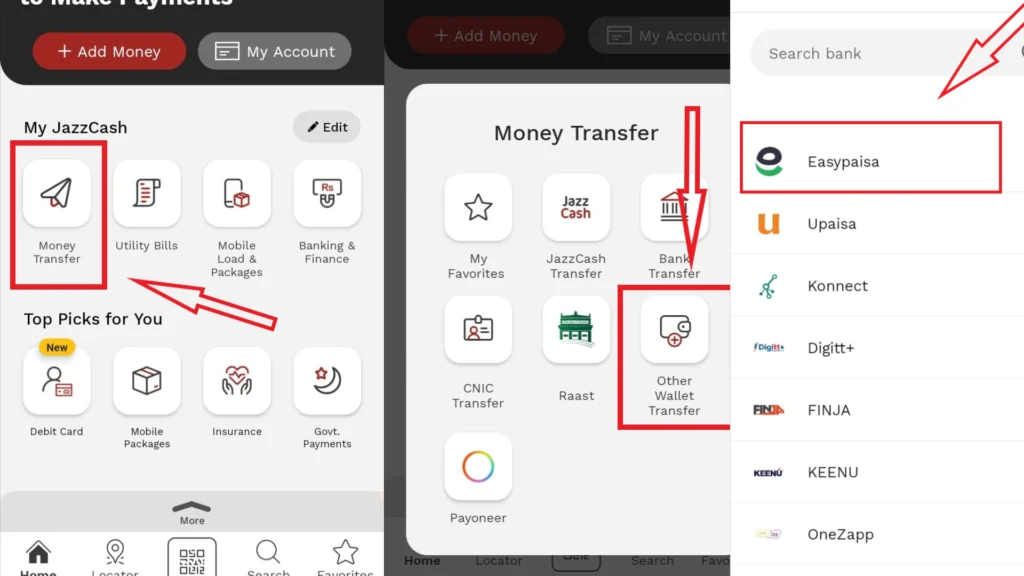
- Log in to your JazzCash app: Open the application on your smartphone and enter your credentials to log in.
- Select “Send Money”: On the home screen, you will see several options. Tap on the “Send Money” button.
- Choose “To Other Wallet Transfer”: A new screen will appear with different transfer options. Select “To other wallet transfer” to send money to another mobile wallet.
- Enter the recipient’s Easypaisa number: Carefully type in the mobile number associated with the recipient’s Easypaisa account.
- Input the amount: Enter the amount of money you wish to send.
- Review the transaction details: Before confirming, double-check the recipient’s number and the amount to ensure everything is correct.
- Enter your MPIN: To authorize the transaction, you will be prompted to enter your 4-digit JazzCash MPIN.
After you enter your MPIN, the transaction will be processed instantly. Both you and the recipient will receive a confirmation message once the funds have been successfully transferred.
Method 2: Using the JazzCash USSD Code
If you don’t have a smartphone or access to the internet, you can still send money using the USSD (Unstructured Supplementary Service Data) code. This method works on any mobile phone and is just as secure.
Follow these steps to transfer money via USSD:
- Dial *786#: From your Jazz or Warid number that is registered with your JazzCash account, open the phone’s dialer and enter *786#.
- . Reply with the number corresponding to the “Send Money” option.Select “Send Money”: A menu will appear.
- Choose “To Mobile Account”: From the next menu, select the option to send money to a mobile account.
- Enter the recipient’s Easypaisa mobile number: Type in the 11-digit mobile number of the Easypaisa account holder.
- Enter the amount: Input the amount you want to transfer.
- Review and confirm: A summary of the transaction will be displayed. Check the details carefully, then enter your 4-digit MPIN to confirm the transfer.
You will receive an SMS confirming the transaction was successful. This method is a great alternative when you are on the go and without an internet connection.
Method 3: Visiting a JazzCash Agent
For those who prefer face-to-face transactions or need assistance, visiting a JazzCash agent is a reliable option. There are thousands of JazzCash agents located across Pakistan, making them easily accessible.
Here’s what you need to do:
- Visit your nearest JazzCash agent: Locate a registered JazzCash retailer in your area.
- Provide the Easypaisa account number: Inform the agent that you want to send money to an Easypaisa account and provide them with the recipient’s mobile number.
- Give them the cash: Hand over the amount of money you wish to transfer to the agent.
- Confirm the transaction: The agent will process the transaction through their system. You will receive a confirmation message on your phone, and the agent will give you a receipt.
This method is helpful if you are not comfortable using the app or USSD service, or if your JazzCash account does not have sufficient funds and you wish to deposit and send money at the same time.
A Smoother Way to Manage Your Money
Transferring money between different mobile wallets like JazzCash and Easypaisa is now easier than ever. Whether you prefer the convenience of the JazzCash app, the simplicity of the USSD code, or the personal touch of visiting an agent, you have multiple secure options to choose from. By following the steps outlined in this guide, you can confidently send money to friends and family without any hassle.
Always remember to double-check the recipient’s mobile number and the amount before confirming any transaction to avoid errors. With these tools at your disposal, managing your digital finances has become more flexible and efficient.